Choosing a coding robot for an entire school is difficult. There are many options, and online stores often list different age ranges than the manufacturers. That's why we checked the manufacturers' official websites (October 2026) for this overview. We look at four things: the age range a robot is designed for, whether you can start without a screen, how students can progress to other types of coding, and whether materials are available in Dutch. We sell Ozobot, so for each robot we also explain when another brand might be a better fit.
What should you consider when choosing a coding robot?
- Age. Young children need something they can handle, such as buttons, blocks, or lines. Older students want to create real programs using sensors and text-based code.
- Starting screen-free. For young children, learning to code without a screen is often the easiest way to get started. It also means you don't need tablets or laptops.
- Progression. Can the same robot continue to work for your students as they get older, or will you need a second system later?
- Teaching materials. Are materials available in Dutch, and do they fit your teaching needs?
- Classroom use. How many robots, devices, and charging stations will you need?
Which coding robots are available for elementary school?
| Robot | Age range according to the manufacturer | First step | Then program with | In Dutch |
|---|---|---|---|---|
| Bee-Bot (TTS) | Young children (early years and Key Stage 1, up to about age 7) | Buttons on the robot (screen-free) | Bee-Bot app | Manufacturer's website in English; lessons by teachers on Wikiwijs and KlasCement |
| Blue-Bot (TTS) | From 3 years | Buttons on the robot (screen-free) | App on a tablet or computer, via Bluetooth | Manufacturer's website in English; lessons by teachers on Wikiwijs and KlasCement |
| Cubetto (Primo Toys) | 3 to 6 years old | Wooden blocks on a board (screen-free) | No screen needed | No text needed to play; website in English |
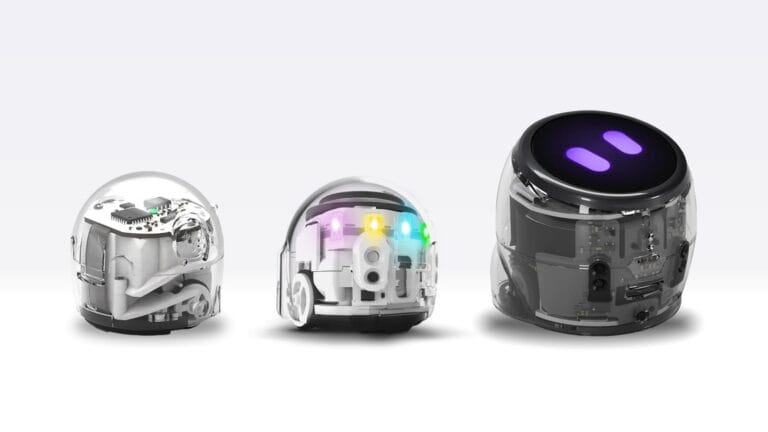
| Ozobot Bit+, Evo, Ari | Evo: about ages 5 to 11; Ari: about ages 8 to 14 | Color codes on a line (screen-free) | Block-based coding, then Python (Evo and Ari) | Ozobot Editor in Dutch |
| micro:bit | From 8 years | Blocks in MakeCode on a computer | Blocks and Python | Partially Dutch-language website; MakeCode in Dutch |
| LEGO Education Computer Science & AI | About ages 5 to 14, across three sets | Build with LEGO and code in Coding Canvas; some lessons are screen-free | Icon or word blocks | Website in Dutch; app and support in English |
| mBot2 (Makeblock) | From 6 years | Build a robot and code with blocks in mBlock | Blocks (like Scratch) and Python | Product website in English |
| Sphero BOLT+ | From 8 years | Draw a route in the Sphero Edu app | Blocks, JavaScript, and Python | App in Dutch; Sphero lessons machine-translated |
The age ranges come from the manufacturers’ official websites. U.S. and U.K. manufacturers use their own school systems (such as “Grades K–5” or “Key Stage 1”). We’ve converted these to ages. Sources are listed for each robot below.
Which robot should you choose, and when?
Bee-Bot and Blue-Bot: for the very youngest children
Bee-Bot is a good choice if you want young children to learn coding without screens, using large, clear buttons. Children enter a sequence of steps and see whether the bee reaches the destination they had in mind. Its maker, TTS, calls Bee-Bot ideal for the early years and Key Stage 1 (TTS).
Blue-Bot is a good choice if you want the same features, plus the option to use an app via Bluetooth. According to TTS, Blue-Bot is suitable for ages 3 and up. In the app, you can program repeats and turns of 45° (TTS).
Bee-Bot is a better fit than Ozobot here: for the youngest preschoolers who aren’t drawing lines or codes yet, and if you want to use floor mats.
Cubetto: wooden blocks, no screen
Cubetto is a good choice if you want to code without a screen or text. Children place wooden blocks on a board, and the robot executes them in that order. Primo Toys designed Cubetto for children ages 3 to 6. Children don't need to be able to read to use it (Primo Toys).
Cubetto is a better fit than Ozobot here: if you’re looking for a hands-on, language-independent learning resource for the very youngest children.
Ozobot: one robot family, from color codes to Python
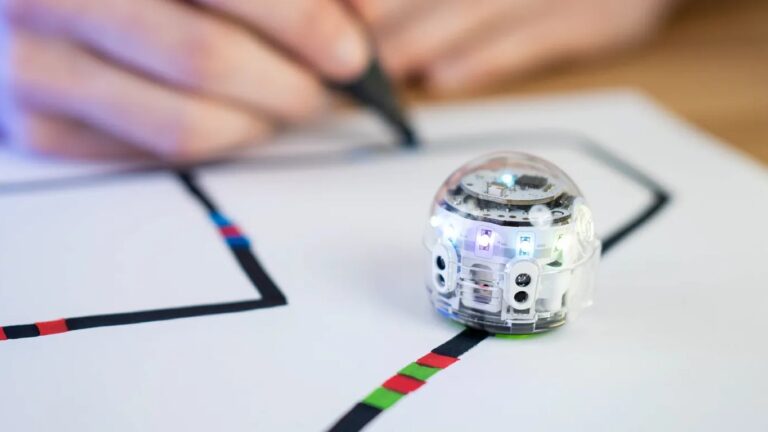
Ozobot is a good choice if you're looking for a system that grows with your students. They start screen-free with color codes, using markers, color code magnets, or color code stickers. Then they move on to block-based coding: with Bit+ in OzoBlockly, and with Evo and Ari in Ozobot Editor. Evo and Ari can also be programmed with Python.
Ozobot recommends Evo for ages 5 to 11 and Ari for ages 8 to 14 (Evo, Ari). Ozobot Editor is also available in Dutch.
Not sure which of the three models to choose? Read Ozobot Bit+, Evo, or Ari: Which Robot Is Right for Your Class?.
micro:bit: build and measure
The micro:bit is a good choice if you want your students to create, measure, or discover things for themselves. The micro:bit isn't a mobile robot, but a small programmable board. It has buttons and LEDs, as well as sensors for light, temperature, sound, and movement. According to the Micro:bit Educational Foundation, it's intended for children ages 8 and up (microbit.org). You can program it with MakeCode or Python. MakeCode can be set to Dutch.
The micro:bit is a better fit than Ozobot here: for projects where students build something themselves using sensors, and if you want every student to have their own board.
LEGO Education: building and coding in small groups
LEGO Education Computer Science & AI is a good choice if you want to combine building and coding. LEGO sells a separate kit for each grade range (Grades K–2, 3–5, and 6–8). Each kit is designed for four students, with one device per group. Some lessons are screen-free (LEGO Education). On the Dutch website, the product line is called LEGO Education Informatica & AI. Links to the app and support are marked as being in English.
LEGO is a better fit than Ozobot here: when building and designing are central, and you work in groups of four.
mBot2: a robot to assemble yourself
mBot2 is a good choice if students want to build and customize their own robot. You can program it in mBlock with Scratch-like blocks or with Python. Makeblock lists mBot2 as suitable for ages 6 and up. There are also add-ons, such as an AI camera (Makeblock).
mBot2 is a better fit than Ozobot here: for technology projects where building and expanding the robot are just as important as coding.
Sphero BOLT+: driving, measuring, and text-based coding
Sphero BOLT+ is a good choice for older students who want to work with a rolling robot. Sphero says BOLT+ is suitable for ages 8 and up. You can program it in the Sphero Edu app by drawing a path, using blocks, JavaScript, or Python (Sphero). The app is available in Dutch. Sphero's lessons are machine-translated (Sphero). For younger children, Sphero offers the screen-free indi, for ages 4 and up (Sphero).
Sphero is a better fit than Ozobot here: if older students want to code in JavaScript, or if you're looking for a robot with a waterproof casing (according to Sphero).
What happens to LEGO SPIKE?
LEGO Education discontinued SPIKE Essential and SPIKE Prime on 30 June 2026. According to LEGO, the SPIKE app and lesson materials will remain available until 30 June 2031. The replacements are LEGO Education Science and LEGO Education Computer Science & AI (LEGO Education). Do you already have SPIKE sets at school? You can continue using them for years to come. If you're looking to buy new sets, consider the replacements.
How many robots do you need for a class?
It depends on how you plan to use them. Here are a few examples from the manufacturers themselves:
- LEGO Education: one set for four students, with one device per group.
- Sphero: according to Sphero, the BOLT+ Power Pack with 15 robots is designed for 30 students.
- Ozobot: Classroom Kits with 12 or 18 robots, a charging station, and Color Code Markers.
If you work screen-free, you don't need tablets or laptops. This applies to Bee-Bot, Cubetto, and Color Code programming with Ozobot. With the micro:bit, mBot2, and Sphero BOLT+, you'll need a device to program.
Read How many robots do you need for a class? to find out what an Ozobot Classroom Kit costs per student, with example calculations for different teaching approaches.
Frequently asked questions
Which coding robot is suitable for preschoolers?
Bee-Bot, Blue-Bot, and Cubetto are designed for the youngest children and use buttons or blocks. With Ozobot, preschoolers can code without a screen using Color Codes, for example with Color Code Magnets, so they don't have to draw the codes themselves.
What's the difference between Ozobot and Bee-Bot?
You program Bee-Bot using the direction buttons on the robot itself. Ozobot follows lines and responds to Color Codes. With Ozobot, you can then move on to block-based coding and, with Evo and Ari, Python programming.
Is the micro:bit a robot?
No. The micro:bit is a small programmable board with buttons, LEDs, and sensors. It doesn't move on its own. You mainly use it to measure, make things, and explore.
Can I still use LEGO SPIKE?
Yes. LEGO discontinued SPIKE Essential and SPIKE Prime on 30 June 2026, but according to LEGO, the app and teaching materials will remain available until 30 June 2031.
Sources
- https://www.tts-group.co.uk/bee-bot-programmable-floor-robot/1015268.html
- https://www.tts-group.co.uk/blue-bot
- https://primotoys.com/faq/
- https://microbit.org/get-started/what-is-the-microbit/
- https://education.lego.com/en-us/products/lego-education-spike-essential-set/45345/
- https://education.lego.com/en-us/products/lego-education-computer-science-and-ai/45520/
- https://education.lego.com/nl-nl/
- https://www.makeblock.com/pages/mbot2-coding-robot
- https://sphero.com/products/sphero-bolt-plus
- https://help.sphero.com/sphero-support/sphero-edu-supported-languages
- https://ozobot.com/products/evo-entry-kit-1
- https://ozobot.com/products/ari-entry-kit