
Discover Ozobot
Ozobot Evo
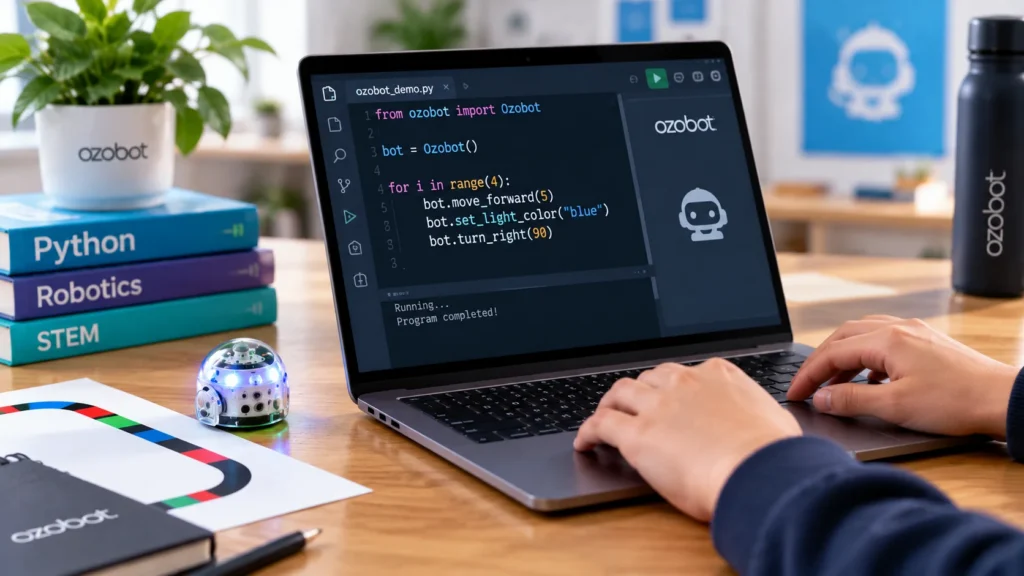
With Ozobot Evo you can program screen-free using Color Code programming, with blocks in Ozobot Editor, or with Python. Evo responds with movement, lights, sound and sensors.

Compact size. Lots to discover.
What is Ozobot Evo?
Ozobot Evo is a compact programmable robot that makes your program visible. You start screen-free with Color Codes and then program with blocks in Ozobot Editor. When you're ready for more challenge, you move on to Python.
Evo responds with movement, light and sound and uses its sensors to see obstacles. This lets you immediately see what your program does so you can adjust it and try again.


01 \/ Color Code programming
Take your first steps with Color Codes
With Color Code programming students work screen-free with markers, Color Code magnets or Color Code stickers. Evo follows the lines and responds to the Color Codes.
The color combination determines the command, for example drive slower, turn, or perform a special move. You don't need to know a programming language for this.
Start with a short route. See what Evo does, change a Color Code and compare the result. This lets you discuss sequence, cause and effect, and debugging.

02 \/ Block-based coding
Drag and combine blocks
In Ozobot Editor you program with blocks: you drag visual blocks onto the workspace and combine them into a program. Ozobot Editor is also available in Dutch, so students can program in their own language.
Connect Evo via Bluetooth and send your program to the robot. You immediately see how Evo executes your instructions. Modify a block and try again.
Check current device and connection requirements when choosing a device.

03 / Python programming
From blocks to textual code
Ready for more challenge? You can also program Evo with Python in Ozobot Editor. Students then write textual code and gradually discover how a programming language works.
The step to Python suits students who already have experience with block-based coding. This teaches them how programming languages work that are also used outside the classroom.

See Evo in action
Get to know Ozobot Evo
Watch Ozobot Benelux's Dutch-language introduction. Start the video to see Evo and its capabilities in motion.
Video from YouTube
This video is loaded via YouTube. Consent for marketing cookies is required for that.
Learning with a robot on the table
Ozobot Evo in education
Evo finds a place in programming lessons and cross-curricular projects. A route on a map, a story or a programming challenge makes the assignment concrete.
With Color Codes you work on sequence, patterns and testing solutions. Afterwards students continue with block-based coding in Ozobot Editor and, when they're ready, with Python.
On our lesson website you can find free Dutch-language lessons and activities that match your students' level.

Who is Evo for?
Evo is suitable for school and home. Students start screen-free with Color Code programming and then progress to block-based coding and Python. That way Evo grows with your students’ level.
Which start is right depends on the activity, the experience and the guidance. Unsure? The chooser helps you decide.

Help choosing
For education
Which Ozobot suits your education?
Answer a few short questions about your students, programming level and way of working. Discover which robot and configuration suit you.
Concrete differences
Compare Ozobot configurations
See the differences between the Entry Kits and Classroom Kits of Bit+, Evo and Ari. Compare up to three configurations side by side.
Explore further

Ozobot Bit+
With Ozobot Bit+ you start accessible with programming. Program screen-free using Color Code programming and continue with blocks in OzoBlockly.
→
Ozobot Ari
Ozobot Ari is a programmable robot with an interactive touchscreen. Program with Color Code programming, Ozobot Editor or Python and learn how AI works.
→
Programming with Ozobot
From a color-code route to Python: discover how to make Ozobot do what you imagine. Choose a programming method, find the matching software and start with a lesson.
→


