Coding in elementary school starts not with a computer, but with a way of thinking. Young children who put the steps of a morning routine in the right order are already practicing computational thinking. This article explains what computational thinking is, how it connects to computer science education, and how to build a progression from Pre-K through Grade 6. Each stage includes examples with and without an Ozobot, plus activities you can use in class.
What is computational thinking?
Computational thinking uses ideas and practices from computer science to solve problems or complete tasks. It is not a programming language, but an approach you can also use in math, language arts, or social studies. Four useful strategies are:
| Strategy | What it means | Example without a screen | Example with Ozobot |
|---|---|---|---|
| Decomposition | Breaking a large task into smaller parts | Describe the steps from getting up to arriving at school | Divide a long route into sections for different groups to draw |
| Pattern recognition | Noticing similarities, regularity, and repetition | Spot patterns in colors and shapes, or in the rhythm of a school day | Notice that a square is four repetitions of “move forward and turn” |
| Abstraction | Focusing on important details and setting aside distractions | Draw a map that shows only what is needed | Draw only the line and codes the robot needs |
| Algorithmic thinking | Putting steps in order, testing, and improving them | Getting dressed or following a recipe | Arrange color codes or code blocks in order and find an error |
Where does computational thinking fit in computer science standards?
In the United States, the Computer Science Teachers Association (CSTA) publishes the 2026 CSTA PK–12 Computer Science Standards, a framework for computer science education from Pre-K through Grade 12. They are organized around five concepts (Algorithms & Design, Programming, Data & Analysis, Systems & Security, and Computing & Society) and twelve practices in four categories; Computational Thinking is one of those categories. Students use these strategies when they design algorithms and create, test, and improve programs, and the same strategies help them solve problems in other subjects. The standards are a framework from a professional association, not a single nationwide curriculum that every school must use, so check your state and district requirements as well. What the standards cover and what your school can do now is explained in Computer Science Standards: What They Cover and What Your School Can Do Now.
The stages below are our own suggestion for a practical progression, not part of the CSTA standards and not a fixed grade-by-grade prescription. Students develop at different rates, and activities can be adapted to their experience and needs. The progression follows three broad stages across elementary school.
Pre-K–Kindergarten: giving instructions and guiding a robot
In the early years, the focus is on exploring. Children can try programming-like activities, including robots and unplugged games. They give a robot instructions, try them out, and make changes until they reach a goal. They learn that instructions form a simple kind of code, whether spoken, shown with pictures, or followed by a robot.
- Without a screen: Play “robot” as a group. One child gives instructions (“two steps forward, turn”), and another follows them exactly. Then put pictures of a morning routine in the right order together.
- With Ozobot: Draw a thick black line on a large sheet of paper and ask children to predict where the robot will go. Then have each group add a section of the route. They can see right away that the robot follows what the line “says.”
Grades 1–3: sequences, repetition, and first codes
At this stage, we suggest helping students become more deliberate about order: they describe what a program should do, test it, and improve it. You can then gradually introduce repetition and simple “if … then” choices, and move on to a visual programming environment.
- Without a screen: Have students describe a route on graph paper using arrows. A partner follows the arrows and looks for an error if the route goes wrong.
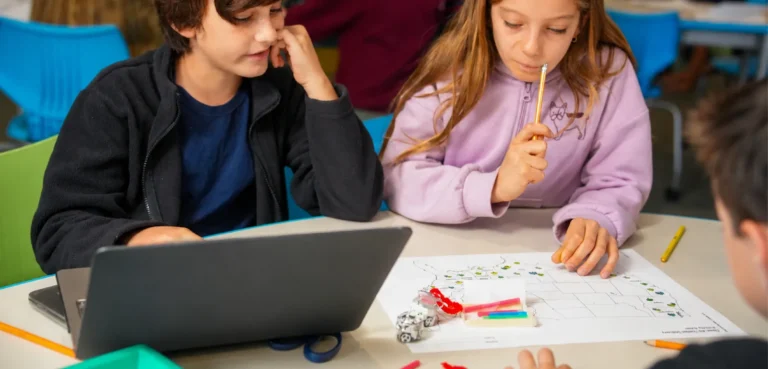
- With color codes: A color code is a short sequence of red, green, and blue squares on a line. Bit+, Evo, and Ari read the same codes. Students explore speed, direction, and special moves, and in a race challenge, groups investigate which codes get the robot to the finish line fastest.
- Algorithms in everyday life: A student guides the robot through a morning routine using color codes and reads the clock at each step.
- First blocks: Once students are comfortable with color codes, they can move on to block-based coding: Bit+ with OzoBlockly, Evo with the Ozobot Editor. With simple sequences, they see how the order of blocks affects the result.
Grades 4–6: repetition, if-then logic, and debugging
At this stage, we suggest letting students design their own programs: plan, build, test, debug, and revise, then try again. You can add conditions, a counter or variable, and ask them to make their code easy for a classmate to read.
- Repetition: Students program fixed and infinite loops with blocks and make a square and an octagon.
- Debugging: Students compare the robot’s behavior with the code, find errors, and test again.
- If-then with sensors: With Evo and the Ozobot Editor, students program an if-then instruction so the robot responds to hand movements.
- Counting and variables without a screen: Students keep track of the intersections, turns, and color changes the robot passes, then record them with a counter or a variable.
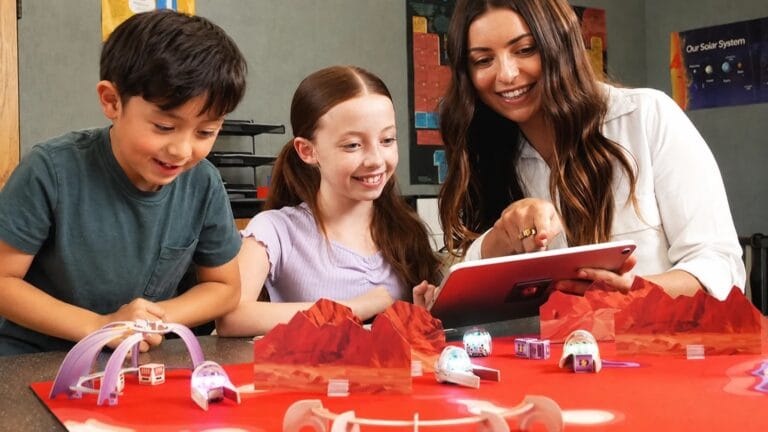
- A larger project: In a Mars mission challenge, students break a mission into smaller tasks and program Evo step by step in the Ozobot Editor. Plan for more than one class period.
The progression at a glance
| Grade | Stage | Focus | Ozobot activity | Example activity |
|---|---|---|---|---|
| Pre-K–Kindergarten | Stage 1 | Giving instructions, sequence, input, and output | Draw lines, predict, and revise | Explore the robot |
| Grades 1–3 | Stage 2 | Sequence, repetition, first if-then ideas, and testing | Color codes and first block sequences | Route challenge, first block sequences |
| Grades 4–6 | Stage 3 | Repetition, if-then, variables, and debugging | Blocks with Evo’s sensors in the Ozobot Editor, projects on a mat | Loops, debugging, if-then, Mars mission |
Two tips for getting started: Begin each stage without a screen so that thinking comes before clicking. And ask students to predict what the robot will do before they run the program. The difference between the prediction and the result is a starting point for debugging.
How do you find activities for a learning goal?
Ozobot activities can support goals such as problem decomposition, automation, and algorithms and procedures. Look for activities that match the concept you are teaching, then adapt them for your students’ grade, robot, and programming approach, such as color codes or block-based coding.
Frequently asked questions
What is computational thinking in simple terms?
It is solving problems the way a computer scientist might: break a large task into parts, spot patterns, focus on important information, and put the steps in a useful order. You do not need a computer to do it.
Can students start coding in Pre-K and Kindergarten?
Yes. Young children can try programming-like activities, such as robots and unplugged games. They can give each other instructions, put steps in order, and guide a robot along a drawn line.
Is computational thinking the same as coding?
No. Coding is one way to apply computational thinking. You can use the same strategies with a recipe, a class presentation, or a map. In the 2026 CSTA standards, Computational Thinking is one of the four categories of practices, next to concepts such as Algorithms & Design and Programming.
Which Ozobot is right for each grade?
For color codes on paper, Bit+ and Evo are good starting points in early and middle elementary grades. For block-based coding, Bit+ works with OzoBlockly and Evo with the Ozobot Editor. Ari reads the same color codes but needs more space: leave at least 38 mm between parallel lines instead of 25 mm. Ozobot recommends Ari for learners in grades 3–8. See Ozobot Bit+, Evo, or Ari for a comparison.
How much time do you need for a computational thinking progression?
This progression is our own suggestion, so there is no required number of hours. A manageable starting point is one lesson per month for each grade, building on the three stages. Plan about one class period per activity; projects such as a Mars mission take several.